How to Implement AI Automation: The 3-Stage Model
A practical 3-stage model for AI automation in SMEs: document the process, partially automate with context, then fully automate where volume justifies it.
The 3-Stage Model: How to Implement AI Automation Without Wasting Money
Most articles about AI automation start in the wrong place. They tell you which tool to buy. We think that is the second question, not the first. After running automation projects across e-commerce, retail, and professional services, we have learned that automation is not primarily a model problem or a tool problem. It is a knowledge and translation problem: getting what people actually do out of their heads and into a form a machine can execute reliably.
At keinsaas we use a simple 3-stage model to get there: document the process, partially automate it with context, then fully automate it once it runs stably. Each stage is useful on its own, and you should not skip ahead. This article walks through the model, the best practices and pitfalls we have seen, and the real use cases where automation pays off fastest.
Why "which tool?" is the wrong first question
Industry guides like ProcessMaker's implementation playbook get one thing very right: the first step is identifying the right processes to automate, not buying software. The most common failure mode we see is teams jumping straight to n8n, Make, or Zapier and building a workflow for a process nobody has actually defined. The result is brittle automation that breaks the first time reality deviates from the happy path.
The questions that matter before any tool decision are: Does this process even need to exist? What actually happens, step by step? Where does human judgment genuinely add value, and where is it just habit? You cannot answer these with a tool. You answer them with documentation. That is Stage 1.
Stage 1 – Document the Process
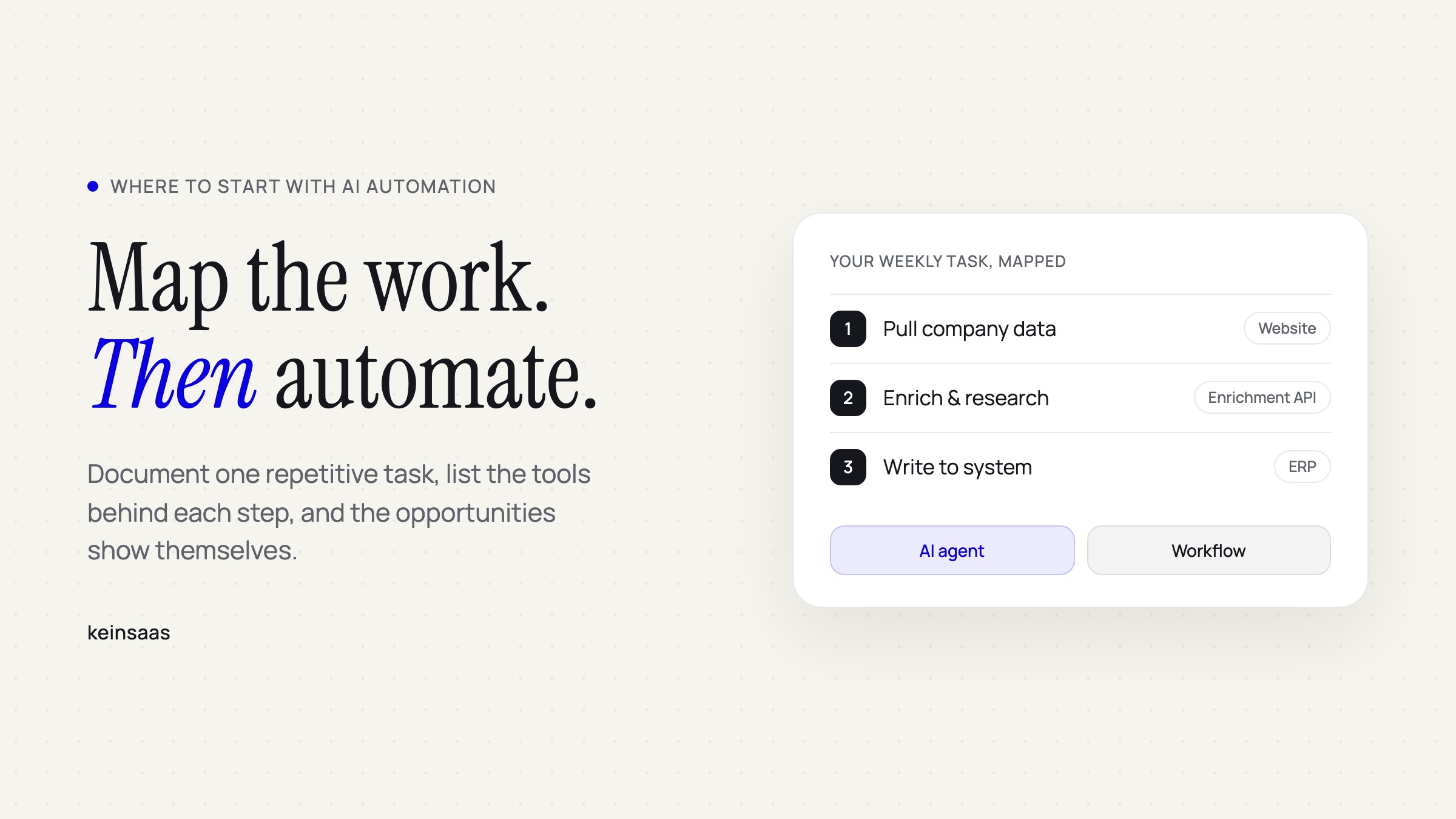
The goal of Stage 1 is not to automate anything. It is to understand what really happens and what is genuinely necessary. Before you write a single workflow, ask the hardest question first: does this process need to exist at all? A surprising number of recurring tasks survive only because nobody stopped to question them. Automating a pointless process just makes the waste faster.
In practice, this works best as a structured exercise:
- Write the process as a checklist plus decision rules. Not prose, not a vague "we handle incoming invoices somehow," but explicit steps and the conditions that branch them.
- Fill it out together as a team. This is where it gets valuable. Two people who supposedly do the same job will describe it differently, and those differences are exactly where errors and inefficiency hide.
- Expect to delete steps. Documenting a process almost always surfaces redundant or obsolete steps that can be removed before any automation is built.
A shared whiteboard works well here, for example a Miro board where the whole team maps the process visually. The artifact you produce in Stage 1 becomes the specification for everything that follows. Skip it, and you are automating guesswork.
Stage 2 – Partial Automation with Context
Stage 2 is where AI enters, but with a human still in control of the critical steps. This mirrors a pitfall ProcessMaker rightly flags: over-automation. Do not automate the steps that define your core promise or that genuinely need human reasoning, soft skills, and intuition. Automate the time-consuming mechanical parts and keep judgment where it belongs. This is the humans-in-the-loop principle, and it is what separates automation that helps from automation that quietly creates risk.
Choosing tools: open source vs. premium
For almost every step there are several tool options, and the trade-off is consistent. Open source and free tools cost little, are highly customizable, and can be self-hosted for full data control, but they require technical know-how and more initial setup. Premium tools are fast to deploy and need little technical knowledge, but carry ongoing license costs, limited customizability, external hosting, and more vendor lock-in.
| Criterion | Open Source / Free | Premium Tools |
|---|---|---|
| Cost | None or very low | Ongoing license fees |
| Setup | More initial effort | Ready to use quickly |
| Customizability | Very high, code editable | Limited to tool logic |
| Privacy & hosting | Self-hostable, full control | Mostly cloud, external hosting |
| Integrations | Often manual | Many ready-made integrations |
| Vendor lock-in | Low | Medium to high |
| Team dependency | Technical know-how needed | Little technical knowledge needed |
There is no universally correct answer. A team with engineering capacity and strict data requirements (common in the German Mittelstand under GDPR) often benefits from self-hosted open source. A small team that needs results next week is usually better served by a premium tool, accepting the lock-in as the price of speed.
Using AI with context: the system prompt
When the automated step involves an AI model, two things determine whether the output is reliable or random.
The first is the system prompt, which sets the model's baseline behavior: its role (support, sales, ops), its tone, its rules and limits, and crucially what it is allowed to decide versus what it must escalate. Without a clean system prompt, every result is a coin toss.
The second is context. Context is what supplies the model with your processes, your data, and your specific knowledge so it produces correct answers instead of generic ones. A model with a good prompt but no context about your business will sound fluent and be wrong. This is the practical core of treating automation as a translation problem: the system prompt and context are how you translate your operational knowledge into something the model can act on.
Stage 3 – Full Automation
Full automation means end-to-end execution with no manual intervention, orchestrated with tools like n8n, Make, or Zapier. It is tempting to jump here first. Do not. Stage 3 only makes sense when three conditions are met: Stage 2 already runs stably, the process is clear and reproducible, and the volume is high enough that building the automation pays for itself quickly.
That last condition is where teams fool themselves, so it is worth doing the math explicitly.
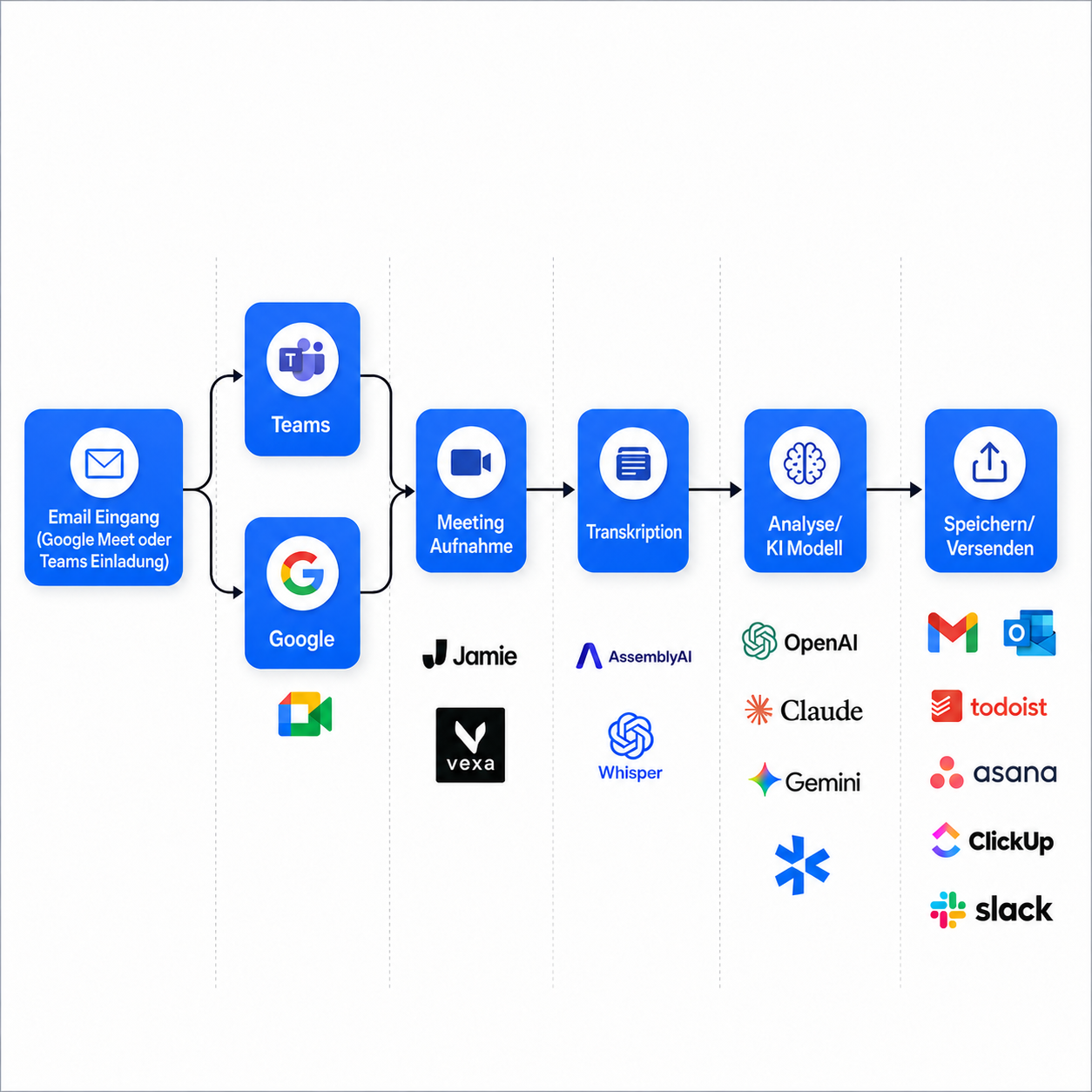
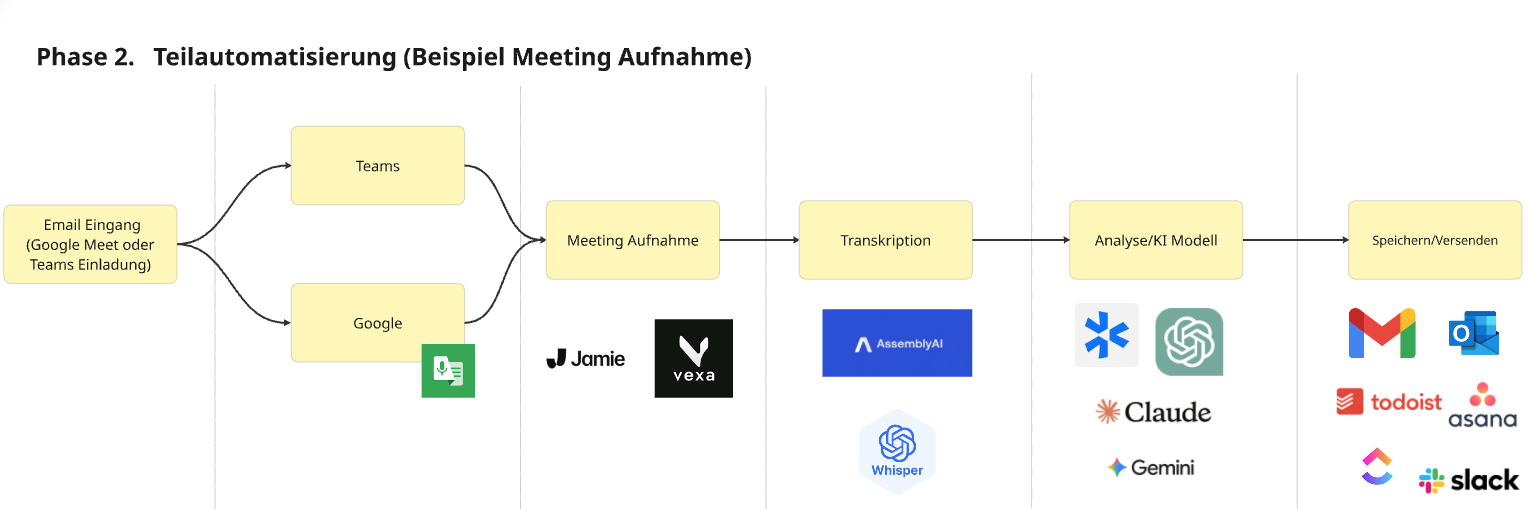
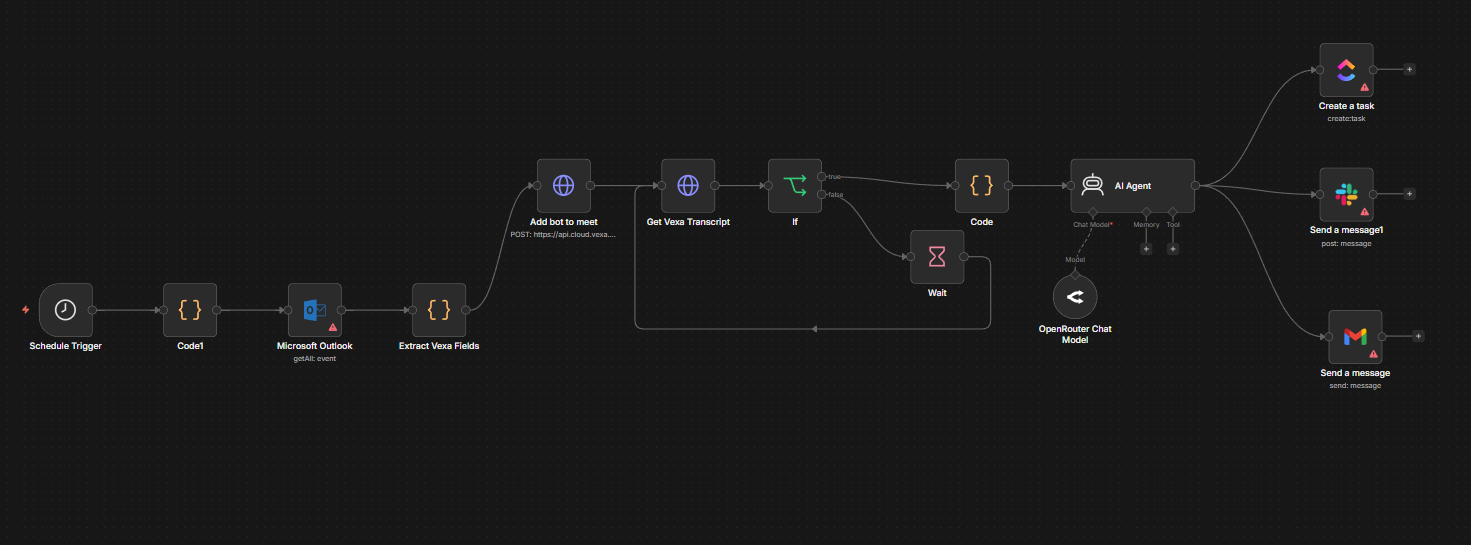
Worked example: meeting recording and notes
Take a recurring task: capturing and writing up meeting notes.
- Manual: 30 minutes per meeting. At 5 meetings per week, 4 weeks per month, 12 months, valued at 50 € per hour, that is 6,000 €/year.
- Partially automated (Stage 2): roughly 10 minutes per meeting.
- Fully automated (Stage 3): roughly 2 minutes per meeting.
If building the full automation costs around 2,000 €, the break-even is 2,000 € / 6,000 € ≈ 0.33 years, about 4 months. After that, it is pure saving. This is the kind of concrete number ProcessMaker means when it says to define success metrics up front: decide whether you are chasing cost reduction, productivity, or a service-quality target, and track it.
The same calculation can kill a Stage 3 project, and that is a feature, not a bug. If the volume is low, the months-to-break-even can exceed the lifespan of the process itself. In that case, stop at Stage 2.
Pitfalls to avoid
Beyond over-automation, a few traps recur often enough to name:
- Obscuring who did what. When AI does the work, the link between human contribution and result fades, and motivation with it. Reward the people who catch the model's mistakes.
- Accumulating technical debt. Tools adopted ad hoc by individual departments pile up faster than anyone can maintain them. Orchestrate centrally rather than letting every team latch onto its own stack.
- Automating away on-the-job learning. If juniors never do the mundane work, they never build the judgment that makes seniors valuable. Automate to free people for harder work, not to hollow out the path that creates expertise.
Real use cases where automation pays off
Across the automation community and our own projects, the patterns that deliver fast returns are consistent. Sorted by function, with the tools we actually reach for:
- Marketing: AI-generated images and video (Fal.ai), SEO and keyword research (DataforSEO), automated content drafting and reporting.
- Sales: lead intelligence and enrichment (Parallel Web), sales pipeline automation (Pipe0), automated qualification and follow-up so no deal slips through.
- Finance: document extraction and analysis (PageIndex), invoice processing, reconciliation.
- Backoffice: intelligent document parsing (LlamaParse), HR and procurement workflows, internal ticketing.
You can browse concrete automation examples in our help center search, and the AI & automation hub itself lives in Navigator.
The takeaway
AI automation rewards discipline, not enthusiasm. Document first, so you understand and trim the process. Partially automate with a clean system prompt and real context, keeping humans on the critical steps. Only then fully automate, and only where the volume justifies the build. Tools matter, but they are the last decision, not the first.
If you want help applying the 3-stage model to your own processes, that is exactly what we do at keinsaas. Explore Navigator or browse our automation examples to see what is possible.

Hagen Rothmann
Co-Founder & Commercial LeadWith his first company, Coconaut.uk, he started automating processes in production and logistics early on. Today, he is driven by the question of how companies can handle recurring work more efficiently, autonomously, and at scale.
Connect on LinkedInReady to build something that fits your team?
Book a free discovery call and we'll map out where custom AI would meaningfully change your week.
Book a discovery call